Microsoft Teams
Microsoft Teams Calling
Understand how external business calling fits into Teams.
Start with the essentials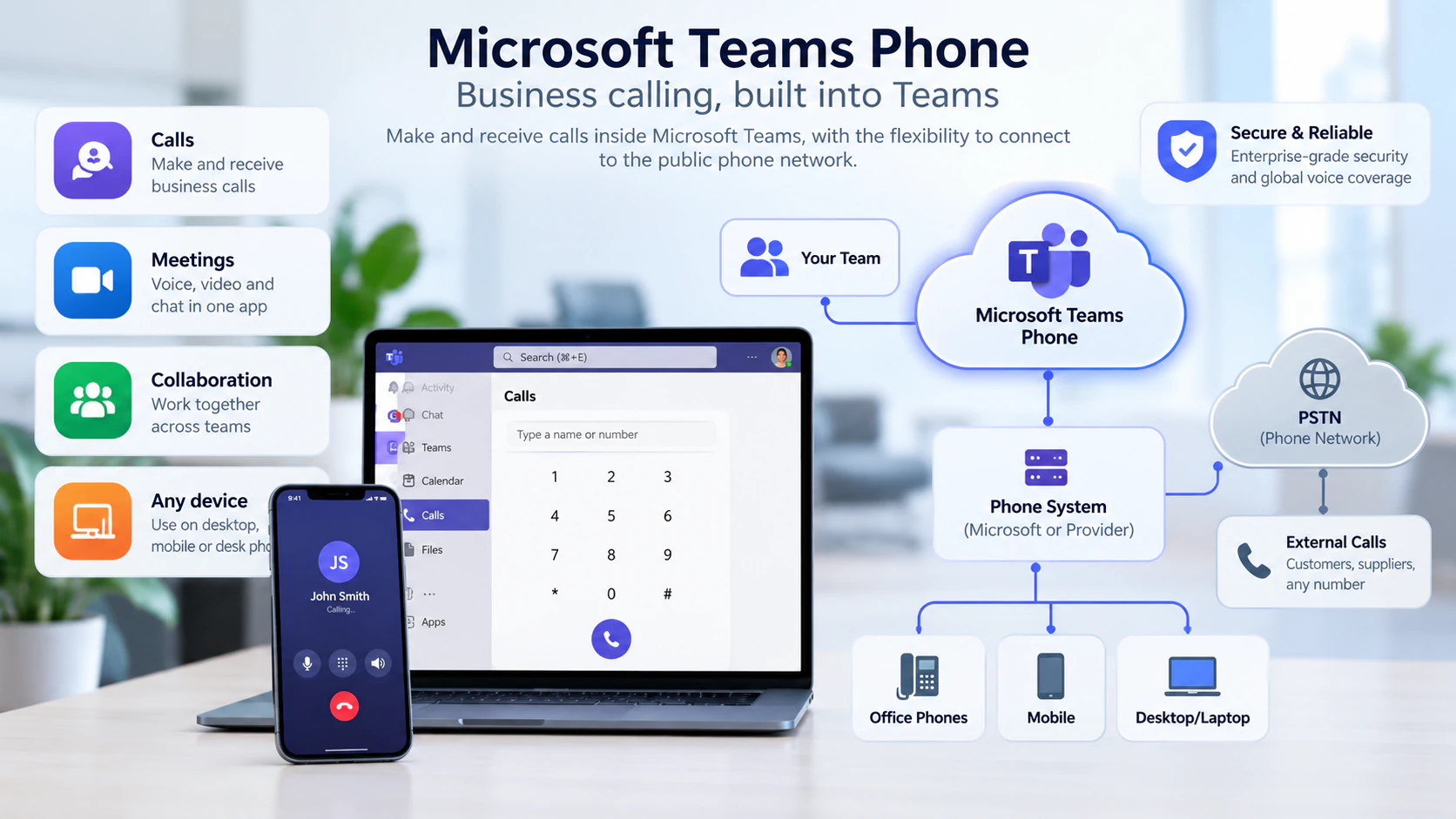
IN SIMPLE TERMS
Teams Phone provides calling features, while a connectivity option links users to public telephone numbers.
FROM THE IDEA TO YOUR WORKING DAY
What this means
for your business
A team already using Teams could explore answering its business numbers in the same workspace.
SEE HOW IT CONNECTS
Direct Routing vs Operator Connect
Two ways to connect Teams Phone to external calling.
Explore this guide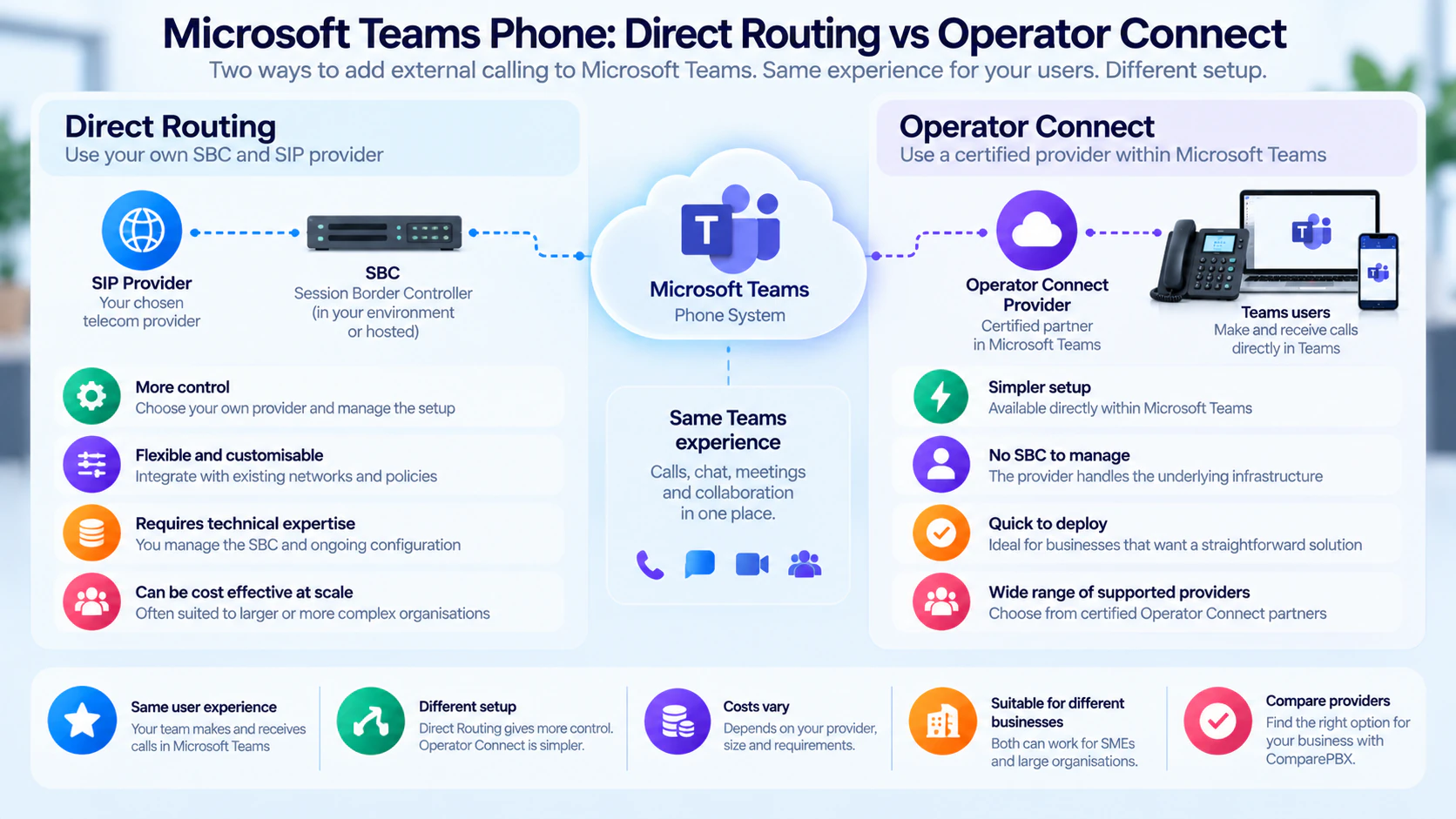
THE QUESTIONS THAT MATTER
Key
considerations
Confirm licences and calling connectivity.
Ask how numbers will transfer.
Identify who supports the complete service.
GO A LITTLE DEEPERTechnical deep dive
Teams collaboration, telephone-system features and public-network connectivity are separate parts of a calling design. Choosing devices comes after establishing how those parts will be licensed, connected and supported.
Teams, Teams Phone and the PSTN
Microsoft Teams is the collaboration environment. Teams Phone adds telephone-system capabilities; PSTN connectivity links the service to public telephone numbers. Being able to join a Teams meeting does not mean a user can make or receive ordinary external phone calls. Check the required licences, number assignment and connectivity for the intended users and locations.
Ways to connect external calls
The operational split differs by connectivity choice. Availability and supported capabilities depend on the market and service.
- Microsoft Calling Plans provide PSTN service from Microsoft in supported markets.
- Operator Connect uses a participating operator for PSTN connectivity, with operator integration into Teams administration.
- Direct Routing connects supported carrier or telephony infrastructure through a certified Session Border Controller (SBC). It allows more design responsibility to sit with your organisation or managed provider.
The SBC is a controlled boundary
For Direct Routing, the SBC connects the Teams service to the other voice network and handles supported signalling and media interworking. It can be provider-managed rather than a box in your office. Certificates, connectivity, routing and monitoring require clear ownership; a certified SBC alone does not make the entire deployment correctly configured.
Users, numbers and policies
An administrator enables the appropriate user capabilities, assigns a telephone number and applies calling policies or routing settings. Shared services such as auto attendants need their own configuration. Plan transfers, caller ID, emergency-location requirements and support escalation as part of the complete service, rather than treating number assignment as the whole deployment.
A SIP phone is not automatically a Teams phone
Native Teams phones provide a Teams-specific experience on supported, certified hardware. Eligible SIP devices may connect through Microsoft’s SIP Gateway with a different feature set and configuration requirements. A generic SIP label is not proof of native Teams support. Check the exact model, firmware, certification/support status and required features before reusing or buying devices.
Manufacturer & platform documentation
Optional further reading from the organisations behind the technology, including standards bodies. Platform examples describe that platform’s implementation.