VoIP
How Does a VoIP Call Work?
Follow a call from the person speaking to the person listening.
Start with the essentials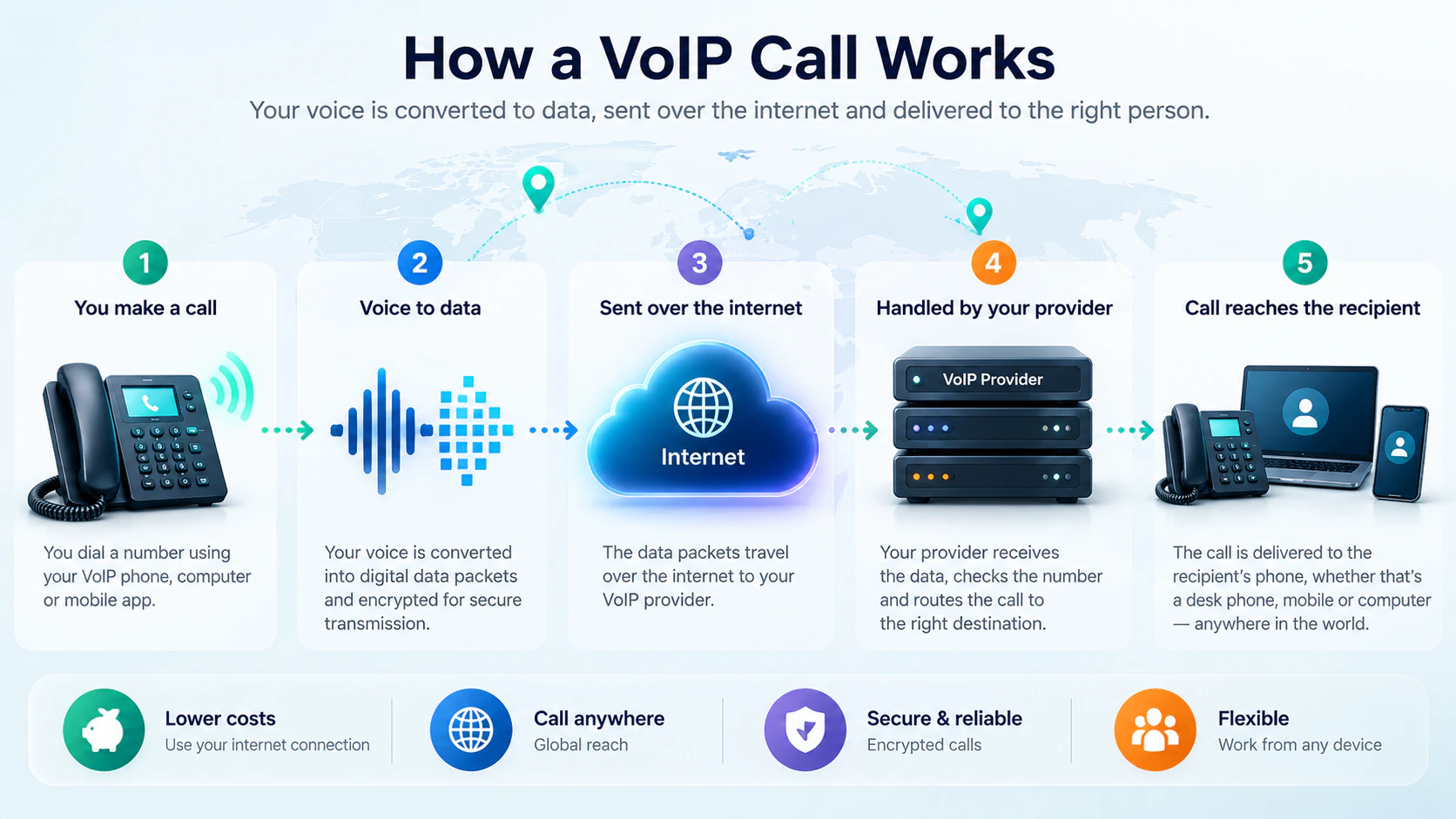
IN SIMPLE TERMS
The device converts speech into data, which travels across a network and is reconstructed at the other end.
FROM THE IDEA TO YOUR WORKING DAY
What this means
for your business
A salesperson calls a customer from a laptop headset through the company’s voice service.
THE QUESTIONS THAT MATTER
Key
considerations
Test calls on the networks people actually use.
Consider headsets and quiet working spaces.
Plan a fallback when connectivity is interrupted.
GO A LITTLE DEEPERTechnical deep dive
A VoIP call has two jobs: arranging the conversation and carrying the sound. Following those jobs separately helps explain why a phone can ring correctly yet still have poor audio.
1. An endpoint starts the call
An endpoint is the device or app someone uses to speak and listen. It might be a desk phone, computer softphone, mobile app, conference device or another compatible endpoint. Pressing Call asks the communications system to reach a destination; a headset attached to a computer supplies audio while the softphone handles the call.
2. The service knows where to find you
Registration associates an account with a reachable device or app. In many SIP systems, the endpoint authenticates and periodically refreshes this association. It is a way of saying ‘reach this user here’, not a permanent audio connection. A registered phone can still fail to make calls if permissions, routing or the network are wrong.
3. Signalling arranges the conversation
SIP, the Session Initiation Protocol, is a common way to request, answer and end calls. The phone sends a setup request, the system applies routing rules, and the destination can report ringing or answer. Not every calling app exposes SIP to the user, even when the wider service uses it.
During setup, session descriptions commonly negotiate compatible codecs and media addresses. Signalling is the control conversation between systems; it is not the sound of the people speaking.
4. Media carries the sound
After setup, the microphone’s audio is encoded and sent in small packets. RTP, the Real-time Transport Protocol, adds sequence and timing information so the receiving endpoint can play that audio in order. Media may travel directly between endpoints or through a platform’s media servers or an SBC. Its path need not match the signalling path.
5. Codecs set the audio and bandwidth trade-off
A codec converts audio into a format both ends can handle. G.711 is a common example: its audio payload is 64 kbit/s in each direction, but packet headers and network overhead make the actual connection requirement higher. Other codecs make different quality, bandwidth and processing trade-offs. Plan for concurrent calls in both directions, other traffic and spare capacity, rather than multiplying a headline codec rate alone.
6. Packets need to arrive on time
A fast speed-test result is not a complete voice-quality check. A conversation depends on steady, timely delivery throughout the call.
- Latency is delay. Excessive delay causes people to talk over one another and makes conversation tiring.
- Jitter is variation in packet arrival time. A jitter buffer smooths uneven arrivals, but buffering adds delay.
- Packet loss means some audio never arrives. Too much loss produces gaps or distorted speech that concealment cannot fully repair.
- Quality of Service (QoS) prioritises voice on networks you control when traffic competes. It cannot guarantee priority across the public internet or create missing bandwidth.
7. Firewalls must allow the media path too
NAT translates private network addresses at the edge of an office network. A firewall controls which traffic can pass. If signalling succeeds but the negotiated media addresses or ports cannot be reached, one person may hear the other while the return audio is blocked: one-way audio. Follow the platform’s supported network design and test both directions, transfers and remote users; opening broad firewall access is not a diagnosis.
8. Protect control traffic and audio separately
TLS can protect supported signalling connections; SRTP can protect supported media streams. Encrypting signalling alone does not encrypt the voice. Ask which parts of a call are protected, where media is decrypted for services such as recording, and what happens when a call reaches another carrier. Secure credentials, maintained firmware and restricted administration matter alongside encryption.
Manufacturer & platform documentation
Optional further reading from the organisations behind the technology, including standards bodies. Platform examples describe that platform’s implementation.
- IETF / RFC EditorSIP: Session Initiation Protocol (RFC 3261) (external website)
- IETF / RFC EditorReal-time Transport Protocol (RFC 3550) (external website)
- IETF / RFC EditorAudio payload formats, including G.711 (RFC 3551) (external website)
- CiscoTroubleshooting voice quality and QoS (external website)
- 3CXFirewall and router configuration — a platform example (external website)
- IETF / RFC EditorSecure Real-time Transport Protocol (RFC 3711) (external website)